
When something gets through, we catch it and clean it up
We watch the devices your people use and the Microsoft 365 accounts they sign in with, and act as soon as something looks wrong: contained, investigated, closed, and explained to you in plain language.
The attacks that get past the firewall
Firewalls and antivirus stop most attacks, but not all of them. The ones that get through usually arrive on a laptop or with a stolen Microsoft 365 password, and attackers then work quietly for days: reading email, setting up forwarding rules, waiting for an invoice to intercept. The cost is rarely the malware itself. It is the fraudulent payment, the lost data or the days spent recovering.
What it means for your business
Attacks caught early
Suspicious behaviour on a laptop or server is spotted and the device isolated before the attack spreads.
Stolen passwords spotted
Unusual sign-ins, new forwarding rules and suspicious app consents in Microsoft 365 are flagged and stopped.
Someone always watching
Huntress's security operations centre reviews endpoint detections around the clock, and our TRC monitors and responds 24/7.
A complete clean-up, not just an alert
Sessions revoked, rules removed, the cause found and closed, and you are told exactly what happened.
What's included
- Endpoint detection and response on laptops, desktops and servers
- Identity threat detection and response for Microsoft 365
- Automatic isolation of compromised devices
- Incident response: containment, investigation, root cause and a written report
- Device health checks that decide who gets remote access (Fortinet)
- Live reporting in inSight: endpoints, detections and escalations
Fortinet EDR
For businesses already on Fortinet firewalls that want the laptop, VPN and firewall working as one.
Huntress EDR and ITDR
For businesses that want a 24/7 security operations centre reviewing every detection, with Microsoft 365 identity protection alongside. Some clients use both.
We run it on ourselves
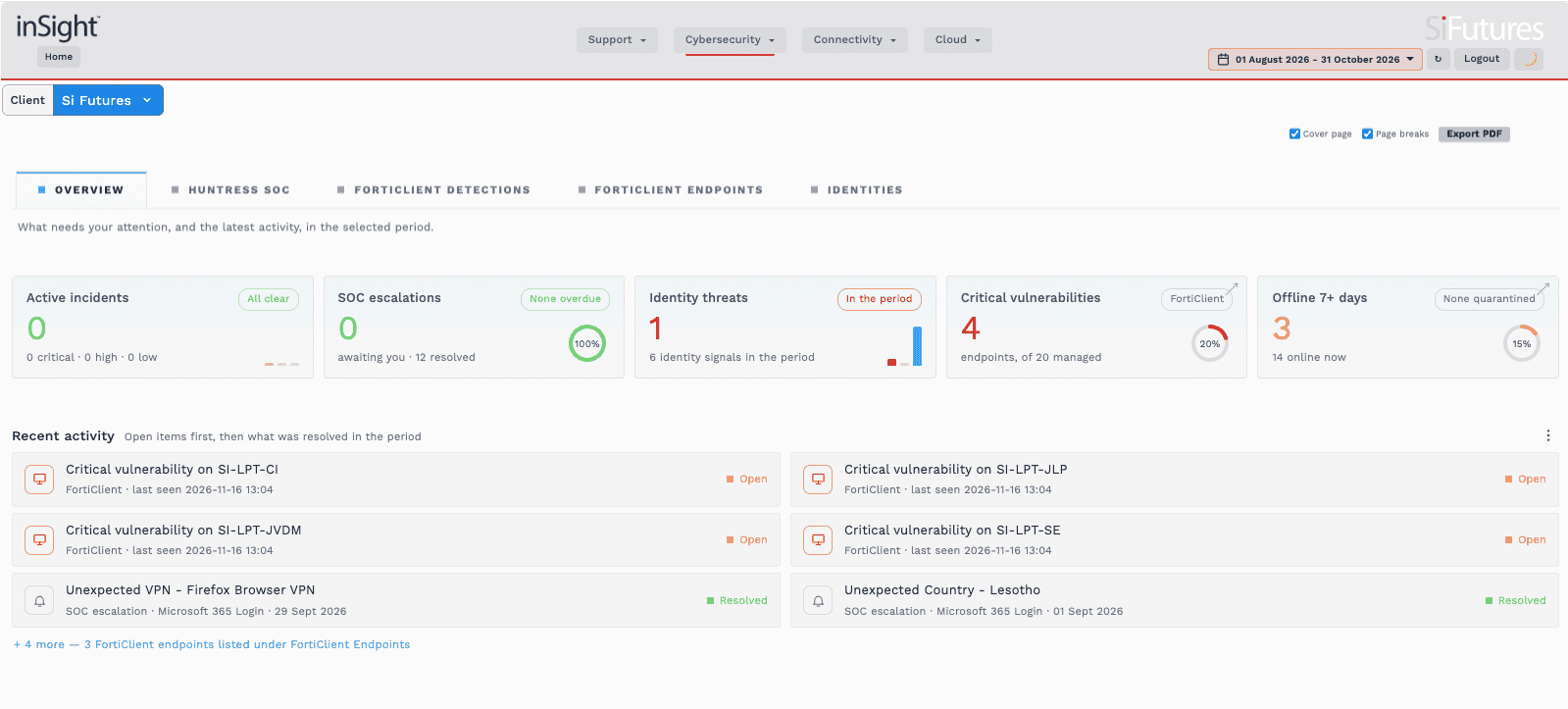
This is our own estate in inSight: no active incidents, every security operations centre escalation resolved, and identity alerts investigated and closed, including a Microsoft 365 sign-in through a consumer VPN and one from an unexpected country.
Open items, like the laptop updates shown here, stay on the list until they are fixed. You get the same view for your business, live.
Problems we've solved
A payment fraud stopped
A Microsoft 365 account was compromised through a personal device and used to attempt a spoofed payment. We investigated, revoked sessions, reset credentials and checked for spoofing before any money left.
An inbox quietly taken over
An attacker diverted subscription receipts and registered a lookalike domain. We locked down the mailbox, removed the attacker's access and rules, and monitored the account for 30 to 60 days. Read more
Remote access from trusted laptops only
For a retailer with almost 600 laptops, VPN access now depends on each device passing a health check every time it connects. Read the case study
Managing Director, logistics company
Related reading: Why VPN and MFA are no longer enough · The 6am call · When one person becomes your reporting bottleneck
Part of one security service
Managed Firewall stops what it can at the edge, detection and response catches what gets past it, and Human Firewall reduces how often people click in the first place. Our Trusted Response Centre™ sees all three.
Common questions
Huntress or Fortinet: which do I need?
Fortinet EDR suits businesses already on Fortinet firewalls that want the endpoint, VPN and firewall working as one. Huntress suits businesses that want a 24/7 security operations centre reviewing every detection, with Microsoft 365 identity protection alongside. Some clients use both.
Who is watching at night?
Huntress's security operations centre reviews endpoint detections around the clock, and our Trusted Response Centre™ monitors and responds 24/7. A major breach is always handled immediately as a P1.
How is it priced?
Per protected device for endpoint detection and response, and per Microsoft 365 user for identity protection. We quote after a conversation and a free initial investigation.
Find out what is already in your environment
Our free Security Risk Assessment shows where you are exposed. Then we talk about what your business actually needs.
Get a free Security Risk Assessment