
The Password Manager Autofill Setting That Protects Client Privacy
Managed Cybersecurity • Credential Security • Data Privacy
Strategic Summary: Password managers are essential security tools, but default autofill matching rules often display every saved account across a domain[cite: 1]. Geordie Hogarth explains how switching to “exact host matching” in 1Password prevents accidental exposure of client names and sensitive account metadata during screen-sharing sessions[cite: 1].
How Password Manager Autofill Matching Works
By default, a password manager offers you every saved login that matches the website you’re on[cite: 1]. It doesn’t just look at the exact host address—it matches across the wider domain[cite: 1].
For most casual users, that’s harmless[cite: 1]. For anyone managing enterprise infrastructure or multiple client environments, it gets messy quickly[cite: 1]. In our case, many firewalls and admin consoles sit under subdomains or IP paths that share a primary domain[cite: 1]. Every time an engineer attempted to log into a specific endpoint, the password manager presented a lengthy drop-down of saved credentials completely unrelated to the device in front of them[cite: 1].
Why It Matters When You’re Sharing Your Screen
The operational clutter was only a minor nuisance—the real vulnerability emerges during screen-sharing presentations[cite: 1].
Picture a support call where an engineer or manager shares a screen to log into a client system[cite: 1]. Clicking into the username field prompts a drop-down menu listing saved accounts—some displaying other clients’ company names or internal account identifiers[cite: 1]. While no passwords or technical secrets are leaked, sensitive metadata and client names are exposed[cite: 1]. The same risk applies to a finance director presenting a portal workflow or a sales team demoing a CRM[cite: 1].
The One Setting to Change
In 1Password, every saved item includes an autofill behavior setting[cite: 1]. The default is “Fill anywhere on this website”[cite: 1]. Changing this to “Only fill on this exact host” ensures credentials appear exclusively on their exact subdomains or host addresses[cite: 1].
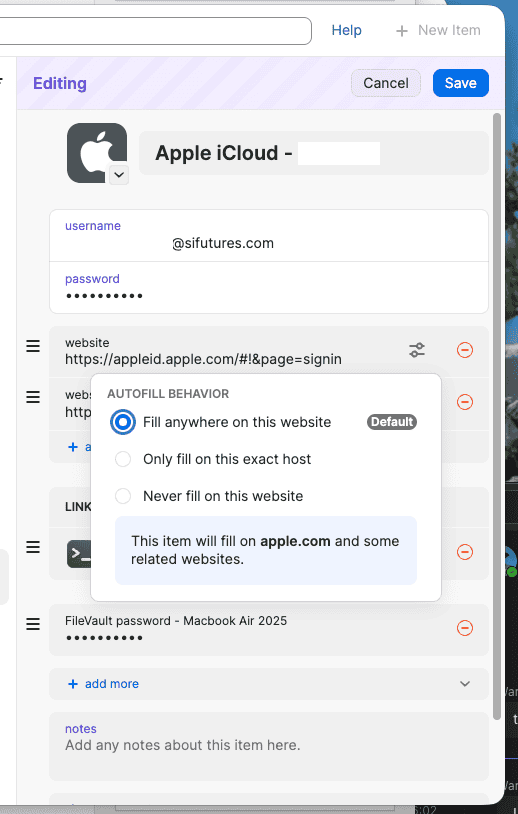
Figure 1: Configuring 1Password’s autofill behavior to target the exact host rather than broad domain matching[cite: 1].
Which Logins to Change First
Because autofill rules are configured per vault item rather than via a single global toggle, teams should prioritize items systematically[cite: 1]:
- Shared Infrastructure Consoles: Admin portals and firewalls hosted under shared corporate domains[cite: 1].
- Presentation Credentials: Accounts frequently accessed during live client demonstrations or video calls[cite: 1].
- Third-Party & Client Vaults: External accounts belonging to partners, clients, or vendors[cite: 1].
Operational Privacy in Practice
Cleaning up password manager vault behaviors delivers immediate operational benefits[cite: 1]:
- Zero Metadata Leakage: Client account names remain completely hidden during screen shares[cite: 1].
- Eliminated Drag: Engineers see only the exact matching credential required for the current host[cite: 1].
- Consistent Security Culture: Small configuration fixes reinforce robust data protection standards[cite: 1].
