When Your Vendor Upgrades on Their Schedule, Not Yours
Network Security • Managed Cybersecurity • Cloud Platform Operations
Strategic Summary: Cloud-hosted security software eliminates infrastructure overhead, but shifts risk directly to integration continuity. Security Specialist Jacques van der Merwe details a recent incident where a Fortinet cloud platform update broke a key Active Directory connector—and explains why continuous integration monitoring is vital for maintaining identity-aware security policies.
When a Cloud Upgrade Breaks Your Security Configuration
In a vendor-hosted environment, the vendor manages the platform and controls its upgrade cycle. That is one of the chief benefits of cloud software: businesses do not need to maintain the underlying infrastructure or manually deploy every platform patch.
However, it also means that upgrades happen according to the vendor’s timetable rather than the client’s operational schedule.
Following a platform upgrade, the Active Directory connector used in the client’s environment was no longer compatible with the updated EMS version. The connection between EMS and Active Directory failed, silently severing an important source of identity telemetry from the security ecosystem.
The firewalls did not stop working. Traffic continued to flow normally. But the critical integration that helped the environment associate specific users with specific devices was no longer functioning as intended.
Our automated monitoring surfaced the connector failure immediately, allowing our team to investigate before it developed into a wider operational or security issue. We identified the version incompatibility, deployed the supported connector build, and restored full identity synchronisation.
The environment returned to normal, but the incident highlighted a crucial principle: cloud-hosted security platforms still require active human and technical oversight.
The Cloud Hosting Assumption SOC Teams Must Challenge
When a business transitions to a cloud-hosted security platform, the immediate advantages are obvious: no on-premises infrastructure to maintain, automatic high availability, and vendor-managed uptime guarantees. These are compelling benefits, and they explain why cloud-hosted security management has become standard practice.
What is less obvious is that “vendor-managed” cuts both ways. When the vendor manages the platform, the vendor also controls when changes occur. The upgrade schedule is theirs. The feature rollout timeline is theirs. And when they update a component that your configuration depends on—an Active Directory connector, an API integration, or an authentication mechanism—you are relying on that upgrade remaining fully backwards-compatible with everything built on top of it.
Sometimes it is. Sometimes, as this incident demonstrated, it is not.
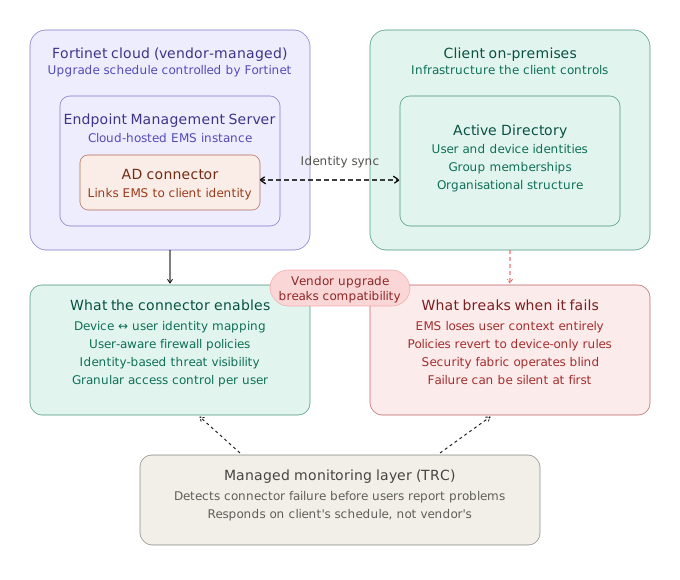
Figure 1: Architectural diagram detailing how Fortinet EMS relies on Active Directory connectors to pass identity telemetry to perimeter security policies.
Vendor-Managed Does Not Mean Risk-Free
Cloud-hosted security management provides clear operational efficiencies. There is less physical infrastructure for the internal team to maintain. Platform uptime is managed at scale, while software enhancements and patch management happen automatically.
However, vendor-managed inherently means vendor-controlled.
The platform evolves continuously. APIs change, authentication standards update, and connectors must be updated to remain compatible. Most of the time, these transitions occur seamlessly. Occasionally, a dependent component breaks.
The operational risk has not disappeared—it has simply shifted from managing physical infrastructure to maintaining integration continuity.
Why Identity Integration Failures Are Uniquely Dangerous
The Active Directory connector provides EMS with real-time identity context. When this connector fails, there is no dramatic network outage. Users keep working, and traffic continues to pass. However, security context silently erodes—leaving access control policies operating on stale or missing user data.
Integration Monitoring Must Be an Ongoing Discipline
Because cloud environments evolve continuously, the middleware, agents, and connectors tied to them must be actively monitored to remain mutually compatible. That requires far more than waiting for users to submit a service ticket.
Organizations managing their own security stack must incorporate explicit connector-compatibility checks into their scheduled maintenance frameworks.
Organizations working with a managed security service provider (MSSP) should ask a fundamental question: Does the provider actively monitor the health of background integration dependencies, or do they only discover failures after end users report security anomalies?
In this scenario, the client never needed to discover the problem or open a ticket. Our monitoring detected the failure instantly, and remediation was underway before security posture degraded. That is what continuous operational visibility achieves.
What Proactive Managed Security Looks Like
Effective managed security extends far beyond responding to alerts after an incident occurs. It requires maintaining full visibility into whether an environment is functioning as designed:
- Response Speed: The vendor upgraded on their timetable. We identified and resolved the issue on ours—which proved much faster.
- Integration Governance: Cloud hosting changes what needs to be managed, but does not eliminate administrative responsibility. The platform provider manages software uptime; your security partner governs integration fidelity, policies, and configuration safety.