Why Fortinet Is Retiring SSL VPN and How We’re Migrating Clients to IPsec
Managed Network Security • Firewall Operations • Remote Access
Strategic Summary: Fortinet has officially removed SSL VPN tunnel mode from FortiOS 7.6.3 onward. Upgrading firewalls without replacing SSL VPN will immediately sever remote worker access. Nicholas Broderick explains why Si Futures is proactively migrating all client environments to hardware-accelerated IPsec VPNs with Microsoft Entra MFA integration.
Si Futures is systematically transitioning every managed FortiGate environment to IPsec VPN ahead of mandatory firmware upgrades.
Why Fortinet Is Retiring SSL VPN
The primary driver behind retiring SSL VPN is perimeter attack surface reduction. SSL VPN architecture has been targeted by repeated high-severity zero-day exploits across security vendors. Completely stripping out SSL VPN eliminates this entire vulnerability class.
Beyond threat reduction, IPsec offers substantial performance advantages. FortiGate security processing units (CPUs/NP SoCs) accelerate IPsec encryption and decryption directly in hardware, whereas SSL VPN relies heavily on main CPU software processing. The IPsec alternative is both significantly faster and inherently more secure.
Proactive Planning: Why We Aren’t Waiting
Most managed client firewalls currently operate on the mature FortiOS 7.4 release branch. This stable branch maintains SSL VPN support, enabling staff to work uninterrupted while engineers build and validate replacement IPsec tunnels.
However, delaying migration until FortiOS 7.6 becomes mandatory introduces operational risk. Should a critical vulnerability emerge in 7.4 that requires immediate patching to 7.6, an unmigrated estate would force a choice between an exposed firewall or disconnected users.
By engineering replacement IPsec configurations months in advance, subsequent FortiOS 7.6 upgrades remain controlled, low-risk operational procedures.
How We Execute the Parallel SSL VPN to IPsec Migration
Si Futures never executes abrupt, single-step VPN cutovers. On every firewall, the new IPsec configuration operates side by side with the existing SSL VPN tunnel during a structured validation window.
Parallel deployments require careful configuration management. Reusing SAML authentication profiles between SSL VPN and IPsec tunnels creates port conflicts that can disrupt live SSL VPN sessions. When leveraging RADIUS authentication, dedicated client policies are created specifically for IPsec to preserve existing SSL VPN dependencies.
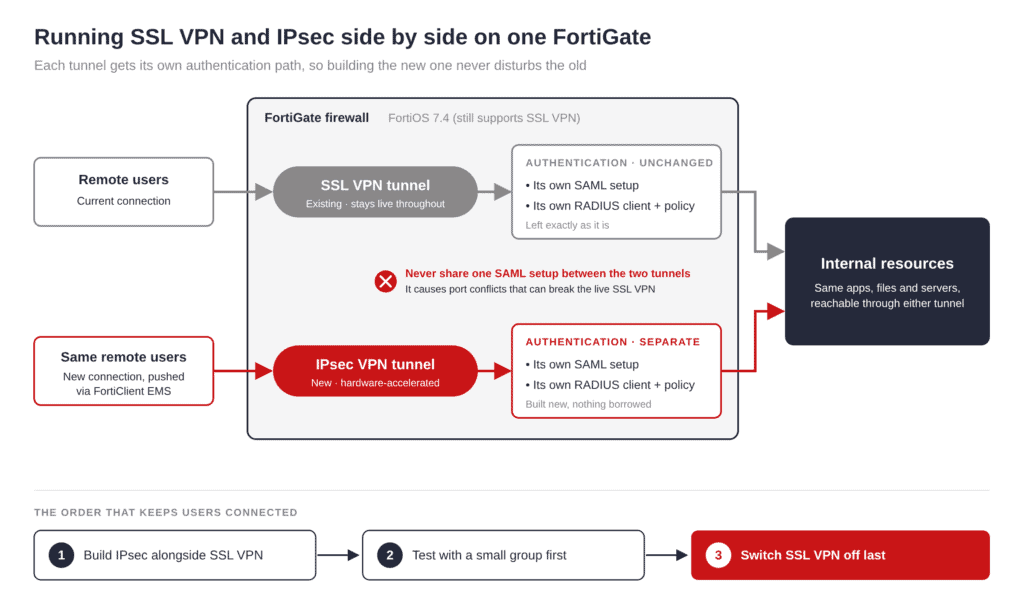
Figure 1: Architectural diagram showing parallel execution of SSL VPN and IPsec tunnels with segregated authentication policies.
Key IPsec Technical Constraints
Unlike SSL VPN, IPsec split-tunneling configurations support CIDR IPv4 subnets strictly—they do not support FQDN domain names or Internet Service Database (ISDB) categories. Environments relying on domain-based split tunneling must re-architect routing rules or transition to full-tunneling models prior to migration.
Sign-In Integration via Microsoft Entra
Where clients utilize Microsoft 365, IPsec VPN authentication integrates directly with Microsoft Entra ID. While the tunnel remains secured by pre-shared keys, user logins require corporate Entra credentials and Multi-Factor Authentication (MFA).
This provides three distinct operational advantages:
- Unified MFA: Leverages existing Microsoft conditional access licensing without purchasing proprietary hardware tokens.
- Centralized Identity Governance: User access and security groups are managed within a single corporate directory.
- Instant Offboarding: Disabling an employee’s Microsoft Entra account revokes network VPN access immediately.
Action Plan for FortiGate Administrators
Follow these essential steps to audit and migrate your firewall estate before upgrading to FortiOS 7.6:
- Disable Automatic Upgrades: Immediately disable automatic firmware updates to prevent an unplanned jump to FortiOS 7.6.3+.
- Audit SSL VPN Portals: Inventory all active SSL VPN portals, associated firewall policies, and user authentication groups.
- Deploy via Endpoint Management: Utilize FortiClient EMS to push out the new IPsec tunnel profiles to remote laptops programmatically.