
Slow System? Find the Cause Before You Buy a Faster Line
Application Performance • Network Diagnosis • Managed Connectivity
Key Takeaway: Slow application performance is often blamed on the line, but more bandwidth only helps when bandwidth is the problem. Find out whether the cause is the link, the route or the application itself before you spend, because a few hours of proper diagnosis can save months of paying for a faster line that never fixes the problem.
Is Slow Application Performance Really a Bandwidth Problem?
“Our system is slow, we need a faster line.” We hear it often, and it’s an understandable conclusion. If people are waiting, more bandwidth feels like the fix. Sometimes it is. Often it isn’t, and the only way to know is to measure.
Start With the Network Path
A client of ours recently had staff waiting 10 to 15 minutes just to sign in to a business application that around 150 people will use across several sites. Some days the application simply gave up and timed out.
The first thing we found was in the network path. A routing issue was sending the traffic on a long detour overseas and back, so users were getting 2 to 3 Mbps out of a line capable of nearly 100. Our network team corrected the route, and on a typical machine throughput went back up to around 88 Mbps. Sign-in dropped from 10 to 15 minutes to under 30 seconds, depending on how busy the link was. People could use the system again.
Measure What the Application Actually Uses
That could have been the end of it, but we wanted to understand why the application needed so much from the line in the first place.
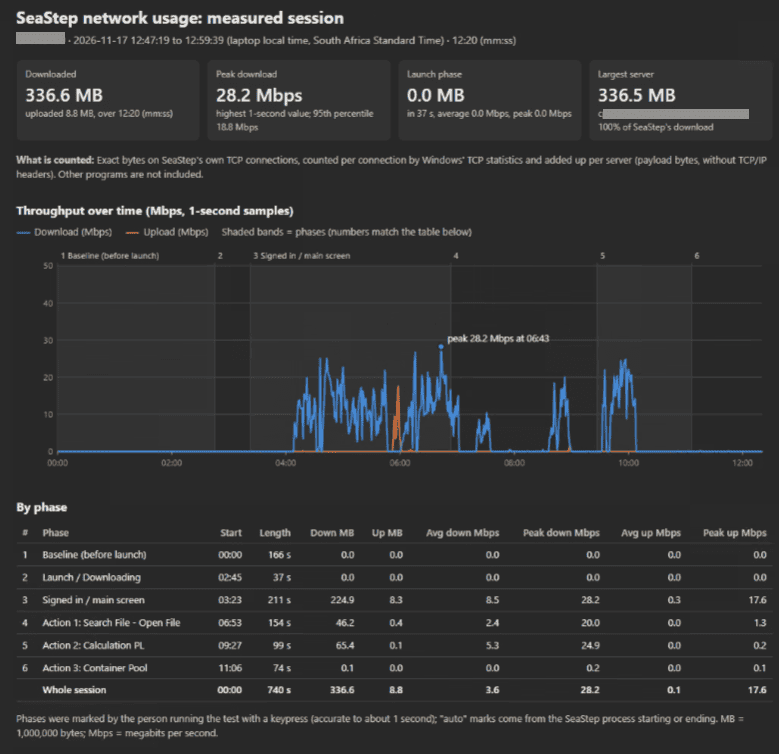
So we measured it properly. Early estimates based on watching network activity suggested about 300 MB per sign-in. Rather than rely on a guess, we wrote a script that tracks the data used by that one application process and nothing else, then had users work through their normal tasks.
Signing in downloaded 224 MB for a single user. Searching for and opening a file pulled another 46 MB, and running one profit and loss calculation took 64 MB. Three ordinary actions added up to 336 MB.
When Slow Application Performance Starts in the Software
Now picture 150 people signing in at the same time each morning, then repeating those actions all day. The links fill up, packets start to drop, and the application slows and breaks for everyone. No sensible line upgrade keeps pace with software that behaves like that.
There was a workaround available. Running the application on a terminal server next to the data would have hidden the problem from users. The client had considered that too, but they want to move away from terminal services licensing. More importantly, they want the cause fixed rather than worked around, and the cause sits with the application’s developers. Our measurements now give them evidence for that conversation. They have also asked us for line upgrade costs, so they can make a fully informed decision.
The Right Fix Depends on the Cause
The right answer isn’t always the same. With another client, people using an installed application were perfectly happy on fibre but had a dreadful experience on mobile data, even at 300 Mbps and above. The application sent data in many tiny exchanges instead of fewer, larger compressed ones, so every delay on a mobile connection multiplied. There, we put mobile users on terminal services and left fibre users on a normal VPN.
Diagnose Slow Application Performance Before You Spend
In both cases the lesson was the same. Before you spend money on bandwidth, find out what’s actually happening. Is it the link, the route, or the application itself? A few hours of proper diagnosis can save months of paying for a faster line that never fixes the problem.
Our managed connectivity services start with measurement, and IT strategy and planning turns what we find into a clear decision on where to spend. Discuss your needs with our engineers.
