Recovering From Cloud Synchronisation Corruption: Granular SharePoint Restoration via Synology
Data Protection • Disaster Recovery • Cloud Infrastructure
Strategic Summary: When an un-linked device migration triggered active dual-device OneDrive sync loops, widespread SharePoint corruption affected core finance and supplier contract directories[cite: 1]. Leveraging a Johannesburg-based Synology incremental backup appliance with granular timeline sliding, Si Futures executed a 100% restoration of critical Master Service Agreements and finance assets with zero operational downtime[cite: 1].
Challenge: Dual-Device Sync Loops & File Corruption
Cloud file synchronization systems provide immense productivity benefits, but synchronization conflict loops can rapidly introduce silent, widespread data corruption across shared document libraries[cite: 1].
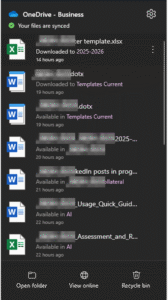
The incident originated when Apple Migration Assistant transferred active user profiles without initiating an explicit OneDrive/SharePoint un-link on the old workstation[cite: 1]. Both legacy and newly migrated devices began broadcasting concurrent updates into SharePoint[cite: 1]. The native sync engine was unable to resolve the rapid collision loops, resulting in severe payload corruption across internal finance directories and critical supplier records[cite: 1].

Figure 1: Corrupted spreadsheet payload showing file structure breakdown following sync loop collision[cite: 1].
A major diagnostic hurdle was that web preview tools proved deceptive: corrupted files frequently rendered valid visual previews but threw severe read errors when opened locally[cite: 1]. This required physical, manual verification across thousands of document paths[cite: 1].
Approach: Forensic Investigation & Integrity Verification
Restoring corporate data required a methodical, four-part diagnostic framework[cite: 1]:
- Granular File Verification: Individual file downloads and raw byte testing to bypass false-positive preview renderings[cite: 1].
- Timestamp Correlation: Mapping conflict event spikes to isolate exact corruption windows[cite: 1].
- Directory Mapping: Methodical auditing across all finance, legal, and supplier directories in the SharePoint tenant[cite: 1].
- Impact Prioritization: Staging high-priority business contracts for immediate, selective restoration[cite: 1].
The Power of Immutable Timeline Sliding
A blanket cloud restore would have overwritten valid, post-incident document changes made by team members[cite: 1]. Using our Johannesburg Synology backup infrastructure, engineers used time-sliding restoration to surgically rollback only the affected files to their exact pre-corruption state[cite: 1].
Solution: Selective Granular Recovery
Recovery was executed via a dedicated Synology backup cluster tracking file modifications through continuous snapshotting[cite: 1]:
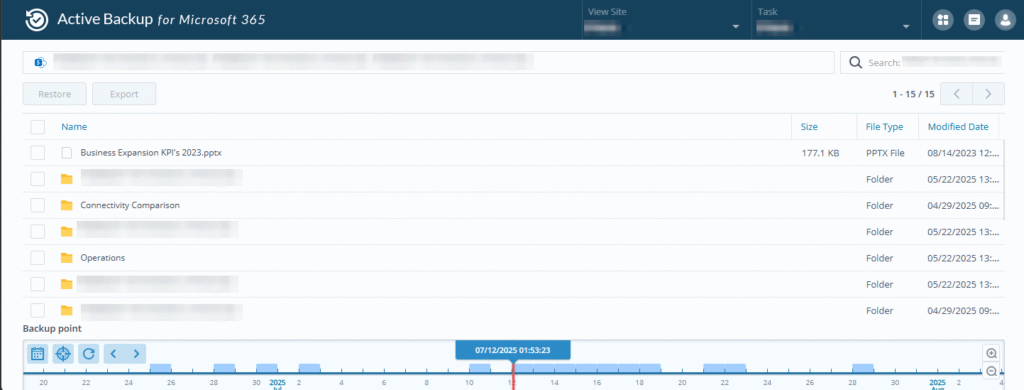
Figure 2: Synology Active Backup interface showing granular timeline sliding for point-in-time file recovery[cite: 1].
- Timeline Isolation: Corrupted payloads created during the conflict window were cataloged and isolated[cite: 1].
- Surgical Restoration: Uncorrupted historical versions were validated and restored to production SharePoint paths[cite: 1].
- Permission Reconciliation: Overcoming SharePoint API lockouts through manual administrative elevation[cite: 1].
Measurable Outcomes & Data Protection
Key operational results from the granular restoration campaign[cite: 1]:
- 100% Core Asset Recovery: Every affected Master Service Agreement, contract file, and finance ledger was fully restored[cite: 1].
- Zero Overwrite Risk: Selective snapshotting preserved all legitimate documents created post-incident[cite: 1].
- Continuous Productivity: Internal operations and client service desk performance remained completely uninterrupted[cite: 1].
Operational Lessons & Hardened Governance
Following full restoration, Si Futures updated its internal device migration protocols[cite: 1]. Standard operating procedures now require forced identity logouts across all cloud sync agents before hardware migrations, alongside scheduled integrity audits across shared document estates[cite: 1].
Protecting cloud environments requires more than native recycle bins—it demands independent, off-site snapshotting[cite: 1]. Learn about our managed IT strategy and disaster recovery services or explore our proactive support operations[cite: 1].